Javascript Array.include and Array.index

Just needed them and poor JS lacks these basic functions…

Warning:
if(![‘hello’].index(‘hello’))alert(‘watch out because 0 is false‘);

Array.prototype.index = function(val) {
  for(var i = 0, l = this.length; i < l; i++) {
    if(this[i] == val) return i;
  }
  return null;
}

Array.prototype.include = function(val) {
  return this.index(val) !== null;
}

Event delegation with almost any Selector

Always reapply the events to the DOM objects when they are inserted or loaded? NO MORE!

There are 3 solutions out there at the moment, jQuery listen, jQuery intercept both by event delegation addict Ariel Flesler and LiveQuery a plugin that reapplys all rules to every new DOM element loaded.

(Event delegation = every div.onclick will reach the parents of the div and can be captured there without binding directly to the div)

Listen and intercept both have a very limited selector choise, ‘a.b’ or ‘a#hello’. LiveQuery can be used rather thoughtfree but comes at a load-time-price for every existing/new element.

I like delegation more, but the selector choise is too limited. So here comes my
‘intercept any selector’ hack!

$.intercept(‘table td div.hello a#click :input’,’click’,fn) will bind your Event to the document, and run on every click of ‘table td…’. The lower you bind, the higher the performance cost(needless event checking)
$(‘table’).intercept(‘td div.hello a#click :input’,’click’,fn) will be faster…

As long as the DOM element you bound your events to is not replaced, all events will continue to work. This approach works best for few(and slow) rules that match many elements. There is no initial performance cost, so your page will load fast.

Only when a event is triggered the checking is done, and can be costly if you used a lot of events or a often triggered event (mouseover…).

The code you need to make it happen is here(insert into intercept.js):

  ...
    for( selector in handlers ){
      if( selector == 'self' && e.target == this || $.intercept.matches($target,selector))
        ret = handlers[selector].apply(this, arguments) !== false && ret;
    }
    return ret;
  };

  /**
   * Walk the element backwards and see if the selector matches (before reaching the document)
   * @see https://pragmatig.wordpress.com/2008/03/08/event-delegation-with-almost-any-selector/
   */
  $.intercept.matches = function(obj,selector){
    var root_reached = false;
    var words = selector.split(' ').reverse();
    for(i in words){
    	do{
    	  //match found?
    	  if(obj.is(words[i])){
    		  obj=$(obj.parent());
    		  break;
  	    }
    	  obj=$(obj.parent());
    	  root_reached = obj.get(0) == document;
      }while(!root_reached);
  	  if(root_reached)return false;
    }
    return !root_reached;
  };
Autoupdate jQuery with Rake

After installing jQuery on Rails (jRails) i noticed that the update task just kept overwriting my jquery.js with an older version. Effectively downgrading it…

So here is a real update task, execute it with rake update:jquery

  #lib/tasks/jquery.rake
  namespace :update do
    desc "Download recent jQuery javascripts to public/javascripts"
    task :jquery => :environment do
      puts "Downloading files..."
      files = {
        'jquery.js'=>'http://code.jquery.com/jquery-latest.min.js',
      }

      require 'open-uri'
      files.each do |local,remote|
        f = File.open "#{js_dir}/#{local}", 'w' do |f|
          f.write open(remote).read
        end
        puts "downloaded #{local} successfully."
      end
      puts "all files downloaded successfully."
    end

    def js_dir
      ActionView::Helpers::AssetTagHelper::JAVASCRIPTS_DIR
    end
  end

PS: If the bleeding edge breaks anything you can get your old version back by jrails:update:javascripts

The other jquery libaries(fx,ui) are missing atm, since i am just using jquery on its own. If you know an update site, please drop a comment.

Test Driven Javascript – Aftermath

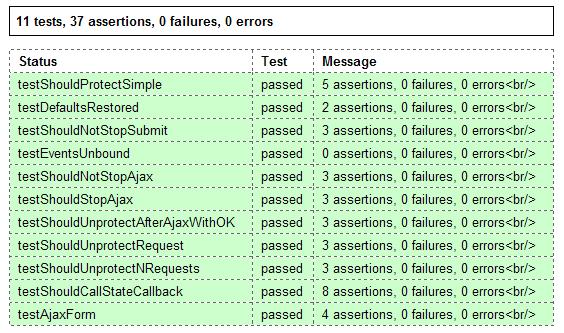
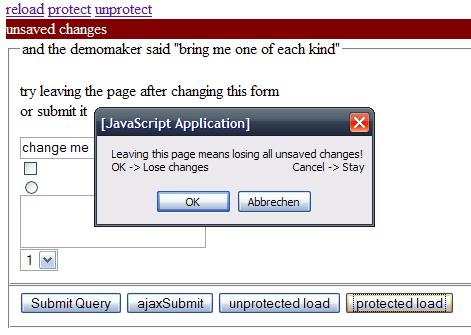
Yesterday i realesed my first Test Driven Developed jQuery plugin!

For development i used newjs (which has some problems with IE6 atm, but they are sorted out), it comes with a simple unittesting framework and all the assertions and help one can want.

Results

1. Its hard to test, because JS is not designed for test

  • No way to handle alerts/confirms or most of the other user interaction.
  • No sleep method, since javascript has no threads, it is hard to wait for 100ms while a request is performed(luckily jsunit helps with wait)
  • Resetting the DOM is often not possible when you rely on 3rd party code, that just does not bothers with reverting its changes. Normal javascript is one way, executed once and works until the user leaves. The only solution is to split your tests into multiple units, one for every test that involves the 3rd party code. (do the TD community a favour and include a reset method in your next libary)

2. Development takes longer but is rewarded

  • Figuring out ways to test your code and ensuring everything gets resetted takes time and effort
  • Testing against multiple Browsers is where you get your time back! When hacking things to work in IE6 i fell in love with my testsuite 🙂
  • Running tests in multiple browsers is automated by newjs (‘rake test’ will start 6 different browsers and run them over your unit tests)
  • You can keep changing the code without any thought about what this will do to this or that browser.

3. Build a prototype and see it work in every browser

  • Ensure that your approach works with all browsers you want to support
  • Look for workarounds early, so that you can build the right thing, the first time

my unittest source if you want to see it run, download the ‘test and demo packadge’

anything missing ? -> drop a comment 😉