Autotest RSpec Notifications for Ubuntu

Get a popup every time autotest runs your tests with the current result.


Install:

sudo gem install ZenTest
sudo apt-get install libnotify-bin

.autotest

require 'autotest/redgreen'

module Autotest::Notify
  def self.notify title, msg, img, pri='low', time=3000
    `notify-send -i #{img} -u #{pri} -t #{time} '#{msg}'`
  end

  Autotest.add_hook :ran_command do |autotest|
    results = [autotest.results].flatten.join("\n")
    output = results.slice(/(\d+)\s+examples?,\s*(\d+)\s+failures?(,\s*(\d+)\s+pending)?/)
    folder = "~/Pictures/rails/"
    if output  =~ /[1-9]\d*\sfailures?/
      notify "FAIL:", "#{output}", folder+"rails_fail.png", 'critical', 10000
    elsif output  =~ /[1-9]\d*\spending?/
      notify "PENDING:", "#{output}", folder+"rails_pending.png", 'normal', 10000
    else
      notify "PASS:", "#{output}", folder+"rails_ok.png"
    end
  end
end
"

The icons go into your ~/Pictures/rails folder

Alternatively, one could use build-in pictures “gtk-dialog-error” / “gtk-dialog-info”…
Fighting the Spec Bloat

Every time i run rspec_scaffold and look at the generated specs im shocked anew, there is just so much bla bla and so little information. I know that as a rule of thumb there should be one assertion per test, but in my opinion this is going too far. Note to self: New rule of thumb: “Test one aspect per test”. Meaning that i test ‘database interaction’ and ‘output’ (renders x + assigns y + flash z) in different tests. And when there is only simple logic (1-liner) in either of them, they may be merged.

OLD

before(:each) do
  @address = mock_model(Address)
  Address.stub!(:find).and_return([@address])
end

def do_get
  get :index
end

it "should be successful" do
  do_get
  response.should be_success
end

it "should render index template" do
  do_get
  response.should render_template('index')
end

it "should find all addresses" do
  Address.should_receive(:find).with(:all).and_return([@address])
  do_get
end

it "should assign the found addresses for the view" do
  do_get
  assigns[:addresses].should == [@address]
end

NEW

it "should render index and assign all addresses" do
  Address.expects(:find).with(:all).once.returns([@address])
  
  get :index
  
  response.should render_template('index')
  assigns[:addresses].should equal([@address])
end

Colorful RSpec Stories

I do not know why there are no colors in the stories, but here is a small monkeypatch to fix this… (setting option[color] and not overwriting them would be better, but i could not find where to set them…)

#vendor/plugins/rspec/lib/spec/runner/formatter/story/plain_text_formatter.rb line ~50
#COLORIZE!
@options.colour = true#HACK
out = "#@count scenarios: #@successful_scenario_count succeeded, #{@failed_scenarios.size} failed, #@pending_scenario_count pending"
if @failed_scenarios.size > 0
  out = red(out)
else 
  if @pending_scenario_count > 0
    out = yellow(out)
  else
    out = green(out)
  end
end
@output.puts out 
#COLORIZE! END
#@output.puts "#@count scenarios: #@successful_scenario_count succeeded, #{@failed_scenarios.size} failed, #@pending_scenario_count pending"

Enjoy the colors 😀

RSpec: Testing Mail Delivery (simple)

To really test mail delivery one needs to send and then grab via smtp, but i do not want to go this far atm. So i wrote a surprisingly simple test, that satisfies my need for coverage and be done with it!

If you messed around with your environment.rb and are not sure wheter emails are send in test mode, just enter a real email and watch the inbox, before sending mass-emails…

#spec/models/user_mailer_spec.rb
describe UserMailer do
  fixtures :users

  before(:each) do
    ActionMailer::Base.deliveries = []
  end

  it 'should send activation' do
    UserMailer.deliver_activation(users(:quentin))
    sent.first.subject.should =~ /has been activated/#correct subject
    sent.first.body.should =~ /#{CFG[:site]}/#url to our site is there
  end

  def sent
    ActionMailer::Base.deliveries
  end
end

My new Programming Font

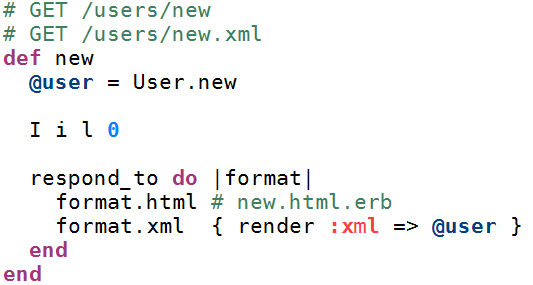
I left Courier new behind quiet a while ago since you cannot distinquish 0OilI. On my way to my new favorite there have been a lot of disappointments, namely Annonymous(just not readable at 14px..), Lucia Sans Console(messes up the indentation).

Im using 16px fonts at the moment, which helps me to focus on one part of the program and spares me to get close to the monitor, to check the spelling.

There are a lot of programming fonts out there, even with screenshots, some rather strange. But most lack the ability to display nicely at 14/16px size.

After throwing away Lucia Console i went on my final search and settled with Bitstream Vera.

16px looks rather lager compared to this 10px lines, but if your got enought resolution, its no problem.

Bitstream Vera programming font