AWS Rolling Replace Kubernetes Nodes without App errors/downtimes

We do a few things to keep the apps on our clusters from crashing during rolling instance replacements, so we can keep the overall noise and deployment errors low. I just wanted to write them up since some of them are not very intuitive and the combination of all of them makes for a really safe cluster updates.

  • Setup PodDisruptionBudget for all deployments so they stay available no matter what combination of nodes we take down
  • When  AWS AutoScalingGroup wants to update (before it takes down instances) we sends a autoscaling hook to SQS and drain the instance, then signal to continue (separate lille app we built but very simple overall)
  • When a new instances is booted, we taint it so no pod lands on a broken node (infrastructure pods with tolerations like CNI are booted quicker too since the node only has a few pods in to begin with)
  • Aws rollingupdate waits for the “all good” signal that we send when the node is finally ready and only then we untaint (nice side effect is also that nodes that never get ready stop the RollingUpdate and causes a Rollback)
  • We determine ready with custom plugins in node-problem-detector which has a few issues but overall works alright.

WebBrick startup is slow if your machine name looks like a domain

Socket.gethostbyname is usually fast if your local machine has a normal name, because it crashes early, but if you have a name that looks like a real domain things take 5s.

Internally webbrick/config.rb does:

ruby -r socket -e 'Socket.gethostbyname(Socket.gethostname)'

Which is slow … wait for https://bugs.ruby-lang.org/issues/13007 to resolve … or rename your localhost to something that does not look like a domain to ruby.

Improving sparkle_formation method_missing

Sparkle formation has the habit of swallowing all typos, which makes debugging hard:

foo typo
dynanic! :bar
# ... builds
{
  "typo": {},
  "foo": "<#SparkleFormation::Struct",
  "dymanic!": {"bar": {}}
}

let’s make these fail:

  • no arguments or block
  • looks like a method (start with _ or end with !)
# calling methods without arguments or blocks smells like a method missing
::SparkleFormation::SparkleStruct.prepend(Module.new do
   def method_missing(name, *args, &block)
     caller = ::Kernel.caller.first

     called_without_args = (
       args.empty? &&
       !block &&
       caller.start_with?(File.dirname(File.dirname(__FILE__))) &&
       !caller.include?("vendor/bundle")
     )
     internal_method = (name =~ /^_|\!$/)

     if called_without_args || internal_method
       message = "undefined local variable or method `#{name}` (use block helpers if this was not a typo)"
       ::Kernel.raise NameError, message
     end
     super
   end
end)

Locking insights: an alternative to redis set nx ex / memcache add

A lock that does not timeout can lead to a standstill and manual cleanup. Simple solution: redis ‘set ex nx’ and memcached ‘add’.

When indefinite locks happen, getting information on why they happen helps to debug the locking mechanism and see if the processes always fail to unlock.

A softer locking approach to receive feedback when locks expire:

Code

def lock
  timeout = 30
  key = 'lock'
  now = Time.now.to_i
  if redis.setnx(key, "#{now}-#{Process.pid}-#{Socket.gethostname}")
    yield
  elsif (old = redis.get(key)) && now > old.to_i + timeout
    logger.error("Releasing expired lock #{old}")
    redis.delete(key) # next process can get the lock 
  end
end

Not 100% safe since the delete could cause multiple processes to get a lock, but depending on your usecase this might be an ok tradeoff.

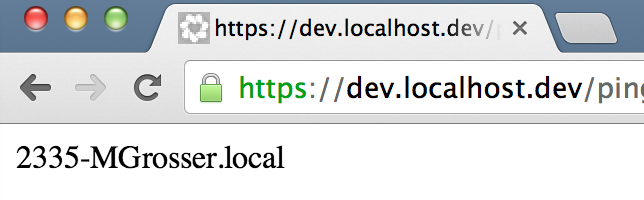
Trusted wildcard SSL certs for localhost on osx / mac

Screen Shot 2013-11-27 at 6.58.11 PM

Create cert

openssl genrsa 2048 > host.key
openssl req -new -x509 -nodes -sha1 -days 3650 -key host.key > host.cert
#[enter *.localhost.dev for the Common Name]
openssl x509 -noout -fingerprint -text < host.cert > host.info
cat host.cert host.key > host.pem

Trust cert

sudo security add-trusted-cert -d -r trustRoot \
 -k /Library/Keychains/System.keychain host.cert

boxen / puppet config

# nginx.conf
server {
  listen 80;
  listen 443 default ssl;

  ssl_certificate     <%= scope.lookupvar "nginx::config::configdir" %>/ssl/localhost.crt;
  ssl_certificate_key <%= scope.lookupvar "nginx::config::configdir" %>/ssl/localhost.key;

  server_name *.localhost *.localhost.dev;


# nginx.pp
  file { "${nginx::config::configdir}/ssl":
    ensure => 'directory'
  }

  $cert = "${nginx::config::configdir}/ssl/localhost.crt"

  exec {"trust-nginx-cert":
    command => "sudo security add-trusted-cert -d -r trustRoot -k /Library/Keychains/System.keychain ${cert}",
    require => File[$cert],
    user => root,
  }

  file { $cert:
    ensure => present,
    source => 'puppet:///modules/company-name/ssl/localhost.crt',
    notify  => Service['dev.nginx']
  }

  file { "${nginx::config::configdir}/ssl/localhost.key":
    ensure => present,
    source => 'puppet:///modules/company-name/ssl/localhost.key',
    notify  => Service['dev.nginx']
  }